AGENTS.md and SKILL.md examples: build a reusable agent toolbox
Start with minimal AGENTS.md and SKILL.md examples, then adapt the portable core alongside Copilot-specific concepts like custom instructions, agents and prompt files. This post explains what belongs where and how to check that the files improve a real agent task.
Part of: Context Engineering · Post 2 of 3 ›
- 01 Context engineering: more context isn't better context
- 02 AGENTS.md and SKILL.md examples: build a reusable agent toolbox
- 03 Agentic memory: what agents should and shouldn't remember
On this page
I was working on a personal project and coming up with a Copilot CLI demo to show and tell at the GitHub Social Club in London. As I started a fresh agent session and typed the setup, I caught myself writing the same lines I’d written for some work a few days earlier.
Those lines covered how I wanted the agent to write a plan, what I expected from the implementation, and how I wanted the work reviewed. I found myself repeatedly hitting the up arrow to recover an earlier prompt. The useful knowledge had nowhere durable to live.
If you’ve arrived looking for an AGENTS.md example or a SKILL.md file example, this post includes a copy-paste starter pair built around one practical scenario. If you’re weighing AGENTS.md vs SKILL.md, the difference comes down to one boundary: AGENTS.md carries the stable facts and expectations for a repository, while SKILL.md carries a procedure that should load for a particular kind of work. Skip straight to the AGENTS.md template or the SKILL.md template if you want the code first.
In my first post on context engineering, I explored how an agent’s results depend on the context we choose to provide. The part I want to pick up here is from the closing section:
Instructions and capabilities lead into reusable agent skills and AGENTS.md-style files. Once you stop treating every workflow as a one-off, you start asking how to package useful behaviour so teams can share it.
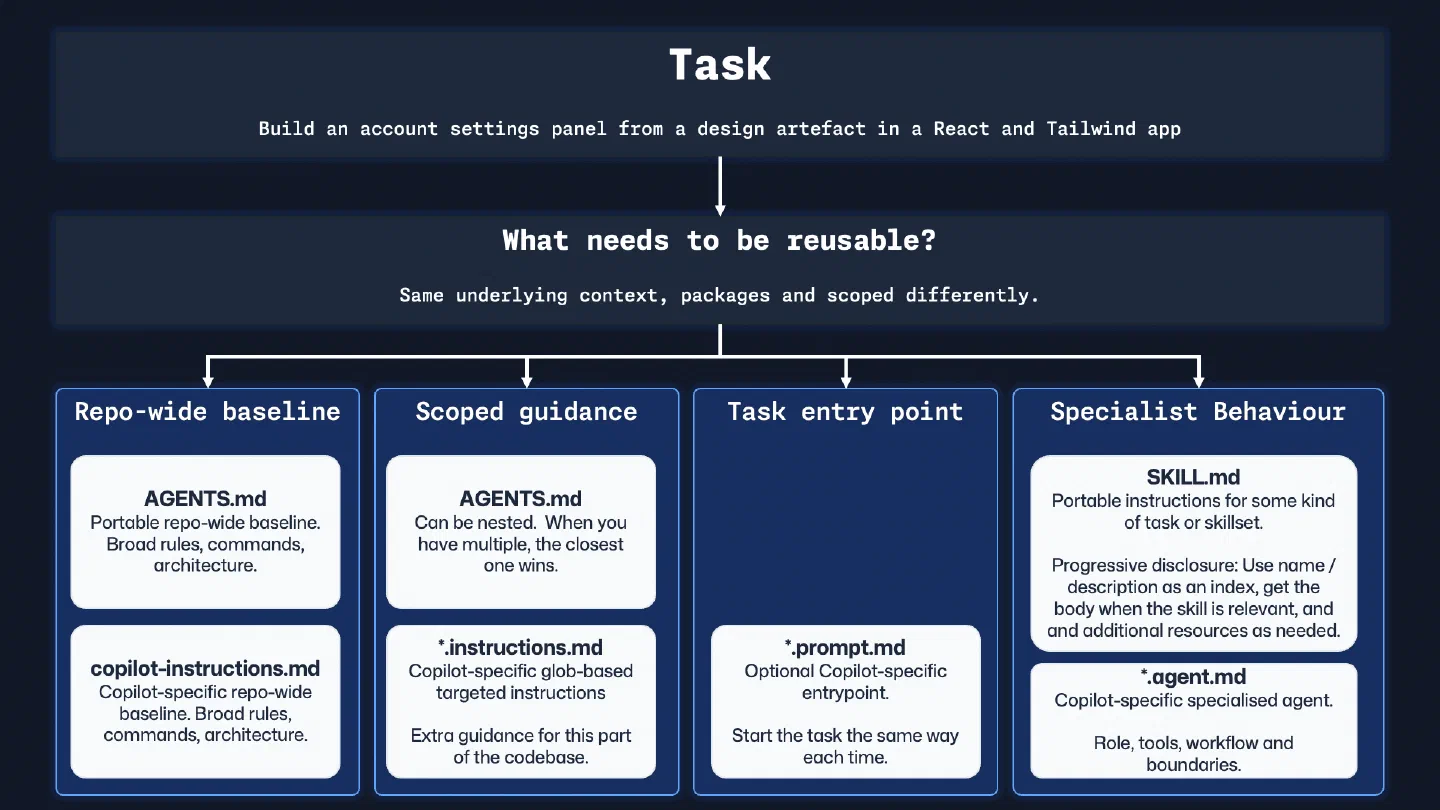
To keep things concrete, I’ll thread a single example through the rest of this post: building an account settings page in a React and Tailwind app. That gives us one thread to follow as the same underlying knowledge is packaged differently at each layer.
If these concepts are new to you, I’d recommend starting with the most portable layer that solves the problem and then adding tool-specific layers when they’re helpful.
Repetition is a context engineering signal
Imagine you sit down to build that account settings page. You might type something like this into a fresh session:
Build me an account settings page. We use React 18 with TypeScript and
Tailwind CSS. Tests go in __tests__/ beside the source files. Use vitest.
Components live in src/components/ and follow PascalCase naming. Don't add
new dependencies without asking. Use our existing Button and Input from
the design system. The page needs email, password, and notification
preferences. Make sure it's accessible, we target WCAG 2.1 AA. Oh, and
run the linter before you finish.
Most of that prompt applies to work across the repository. The testing conventions, the naming rules, the component library and the accessibility baseline are repository knowledge. That information belongs somewhere the agent can find it without you having to type it out every time.
That is the framing I use for AGENTS.md: rules that apply across the whole repository. A workflow you only need for one kind of task needs a different home, which I’ll come to when we reach SKILL.md.
Agent sessions are temporary. You complete a task, start a new session for the next thing and begin again. Capturing the reusable guidance gives the next session a better starting point and gives the team something shared to improve.
AGENTS.md: repository-wide agent instructions
This layer tells an agent how to work in this codebase regardless of today’s task: the stack, the folder structure, the validation steps, the conventions, and the mistakes to avoid. Think of it as lightweight onboarding for an AI collaborator. (Assuming you’re not working in a monorepo, in which case you may have a few of these files to cover different subprojects or packages. But I’ll come back to that.)
AGENTS.md example: a starter template
The most widely recognised portable version of this idea is AGENTS.md. This is how those repository-wide rules might look for the settings page example:
# AGENTS.md

## Repository overview

React 18 + TypeScript + Tailwind CSS. Vitest for unit tests.

## Repository map

- `src/components/` - UI components (PascalCase naming)
- `src/hooks/` - Custom hooks (camelCase, `use` prefix)
- `__tests__/` - Tests beside source files

## Working agreement

- Prefer existing design system components (`Button`, `Input`, `Card`)
  over custom styling
- Do not introduce new dependencies without explaining why
- Target WCAG 2.1 AA compliance for all interactive elements

## Validation

- Run `pnpm lint && pnpm test` before finishing
- Report which checks ran, which failed, and which could not run
Keep the actual task (“build an account settings page”) in the prompt. The AGENTS.md file contains the knowledge that applies to any task in the repository. Tomorrow you might build a dashboard, next week a checkout flow. The conventions are the same each time.
Before using the template, replace the stack, paths, commands, and accessibility target with facts from your repository. Keep the validation commands executable. “Write good tests” leaves room for interpretation; pnpm test gives the agent and reviewer an observable result.
What makes AGENTS.md useful is that the knowledge is written in plain Markdown and can be adapted across agent tools. The loading rules and level of support are not universal. At time of writing, for example, GitHub documents agent instruction support for AGENTS.md, CLAUDE.md, and GEMINI.md across specific Copilot surfaces in its current support matrix. Check the documentation for the tool and surface you’re using before relying on a particular file location or precedence rule.
Some tools also support nested AGENTS.md files. If you have a shared root file with the broad baseline, you may be able to add more specific files deeper in the tree for subprojects or packages. Check your tool’s precedence rules before depending on that behaviour. In tools that follow the AGENTS.md guidance, the closest file in the directory tree takes precedence, allowing services/api/AGENTS.md to carry commands and gotchas that only apply to that part of the codebase.
GitHub Copilot-native example: .github/copilot-instructions.md
If you’re primarily a GitHub Copilot user, then you may be familiar with Copilot Custom Instructions. The same repository-wide baseline can also live in .github/copilot-instructions.md, though Copilot supports AGENTS.md in several surfaces too. The support matrix shows which instruction formats each Copilot surface currently reads.
I see these as different packaging approaches for the same layer of repo-wide guidance. However, I wouldn’t duplicate the same baseline into both files. As we know from software development, duplication is a source of drift. Keep one as the source of truth and link to it from the other if you need to use both.
If you want the primary reference for AGENTS.md rather than my blog post, start with agents.md and the agentsmd/agents.md repository.
SKILL.md example: a starter template for a reusable procedure
Repository-wide instructions are broad by design. A SKILL.md file packages a procedure that should load for a particular kind of work and can be reused wherever that work appears.
For the settings page, building a UI component from a design reference is one such procedure. This starter follows the current Agent Skills specification and can be adapted inside a supported skills directory:
---
name: design-to-component
description: >
  Convert a design artefact into a React component using the project's
  design system. Use when building UI from mockups, wireframes, or
  Figma exports.
---

# Design to Component

## Core procedure

1. Identify the visual elements and their interactive states
2. Map each element to existing design system primitives
   (Button, Input, Card, etc.) before creating anything custom
3. Build the component with semantic, accessible markup
4. Write tests for user interactions and edge states
5. If the design references tokens not in the local system,
   load `references/design-tokens.md` for the full mapping

## Validation

1. Run the repository's component tests and accessibility checks
2. Compare the implementation against the supplied design reference
3. Report any missing states, unavailable assets, or checks that could not run
Before using it, make the description specific enough that an agent can recognise when the skill applies. Replace generic validation language with real commands where the procedure is tied to one repository. Supporting scripts, examples, and reference material belong beside the SKILL.md file when they help the agent perform or check the work; GitHub’s current skills documentation shows one implementation of that directory structure.
Why skills scale: progressive disclosure
A well-behaved skill loads in stages. The Agent Skills specification describes a three-stage progressive disclosure model that keeps the initial context small. The figures and stage names below reflect the spec at time of writing, so check the spec directly if you’re implementing against it:
Metadata first (~100 tokens per skill). At startup, an agent only needs the
nameanddescriptionfrom each skill’s frontmatter. This acts as the index. If a task doesn’t match, the skill body doesn’t need to be loaded.Instructions on activation (<5,000 tokens). When a skill is relevant to the current task, the agent can load the full
SKILL.mdbody: the procedure, the gotchas, the validation expectations.Resources on demand. If the instructions reference supplementary material (scripts, design token tables, API schemas or any other assets), those can then be loaded when a specific step calls for them.
The agent loads the skills that apply to the task, then reaches for their instructions and resources as needed. Skills can also be combined: one workflow might use planning and testing procedures, while another only needs a documentation procedure. That keeps the context focused while giving teams reusable capabilities they can improve independently.
For the format itself, the Agent Skills specification is the place I’d start, and skills.sh is useful once you want to find examples to work from.
Copilot-specific layers in your agent toolbox
On that point, I use GitHub Copilot every day, so it’s worth me talking about some Copilot-specific alternatives that can also be used to package reusable knowledge. These reflect how Copilot works at time of writing, so check the GitHub docs if anything has moved on since.
Important: Copilot supports
AGENTS.mdandSKILL.mdalongside its own formats. The GitHub documentation covers the current support for AGENTS.md and SKILL.md.
Copilot adds file-scoped instructions, specialist agents and repeatable prompt files around the repository-wide baseline. The diagram below shows how those layers can support the same task before we look at each one.
*.instructions.md: optional file-scoped rules in Copilot
A testing folder may have patterns that are irrelevant to the API layer, while documentation needs its own tone and structure. Path-specific instructions keep those rules close to the files where they apply.
In Copilot, you can use .github/instructions/*.instructions.md files with an applyTo glob to scope where the instructions apply. Sticking with our account settings UI overhaul example, the same pattern could look like this:
---
applyTo: "src/components/**/*.tsx"
description: Rules for React UI components
---

- Prefer existing design system primitives before creating a custom component
- Keep visible labels bound to every input
- Use `fieldset` and `legend` for grouped notification preferences
- Keep validation messages specific and next to the relevant field
That keeps the React-specific guidance close to the components where it applies and out of unrelated work.
.agent.md: optional specialist roles in Copilot
Agent files (.github/agents/*.agent.md) let you define specialists with clearer expertise and boundaries. A test auditor or documentation reviewer can stay focused on one kind of work.
The specialist’s limitations matter as much as the expertise. A good agent file says what the specialist does and doesn’t do. That makes the behaviour more predictable and makes composition easier as each specialist has a narrower scope.
Sticking with the account settings example, while we’re intending to get more specific, I would make the specialist a bit broader than “build this one page” otherwise we’re building something too specific to be repurposed. A frontend specialist could help across onboarding, checkout, billing, and profile work while still being more focused than a general frontend role:
---
name: Frontend Forms and Accessibility Specialist
description: Build and review product forms using existing UI patterns, accessible defaults, and realistic validation behaviour
tools: ["read", "search", "edit"]
---

<role_boundaries>

## What You DO:

- Build and review forms using existing design system components
- Preserve labels, error states, focus management, and keyboard support
- Add or update tests for validation, submission, and edge states

## What You DON'T Do:

- Rewrite server-side auth or billing logic
- Invent a new form pattern when the design system already has one
- Change product rules without an explicit brief
  </role_boundaries>
This is where the work starts to feel less like one-off prompting and more like deciding how your team wants agents to work. You decide which responsibilities belong together, where the handoffs should be, and how specialised each role needs to be.
.prompt.md: optional repeatable entry points in Copilot
Prompt files (.github/prompts/*.prompt.md) are repeatable entry points for common tasks.
So back to our running example, the prompt that kicks off the implementation of our settings page might look like this:
---
name: implement-settings-page
description: Build or update a settings page from a design reference
agent: Frontend Forms and Accessibility Specialist
argument-hint: Link to the design or describe the settings page
---

Build or update a settings page from:
${input:design:Design link or short brief}

This might be account settings, developer settings, theme settings,
or another settings surface. You may only stop once the page, validation,
tests, and accessible states (via the `npm run test:accessibility` command) are in place. If not, consider what's missing and iterate until all requirements are met.
Chris, isn’t that just saving a text snippet? There is more to it. A prompt file can collect user input and hand the task to a specific agent. That gives you a quicker way to start and gives the team a shared entry point for the workflow. At time of writing, prompt files are also a Copilot feature in public preview in VS Code, Visual Studio, and JetBrains IDEs.
If you’re going deeper on the Copilot side of this, I’d bookmark GitHub’s docs on custom instructions, prompt files, and custom agents. And once you’re looking for some real-world examples, the Awesome Copilot repository, the site, and its Learning Hub are good next stops.
Choosing the right layer for your agent toolbox
Each format solves a different problem, and several may belong in the same repository.
| Layer | Scope | Format | When I’d reach for it first |
|---|---|---|---|
AGENTS.md | Repo-wide guidance | Open format; loading rules vary by tool | I want a plain-Markdown baseline that can be adapted across supported tools |
SKILL.md | Reusable procedure | Open specification; locations and capabilities vary by tool | I want a procedure that loads for a relevant class of work |
.github/copilot-instructions.md | Repo-wide guidance | Copilot-specific | I use Copilot heavily and want to establish a repo-wide baseline |
*.instructions.md | File or path-scoped guidance | Copilot-specific | Different parts of the repo need different defaults |
*.agent.md | Specialist role | Copilot-specific | I want a named specialist with particular tools, workflow, and boundaries |
*.prompt.md | Repeatable task entry point | Copilot-specific | I run the same task often and want a cleaner starting command |
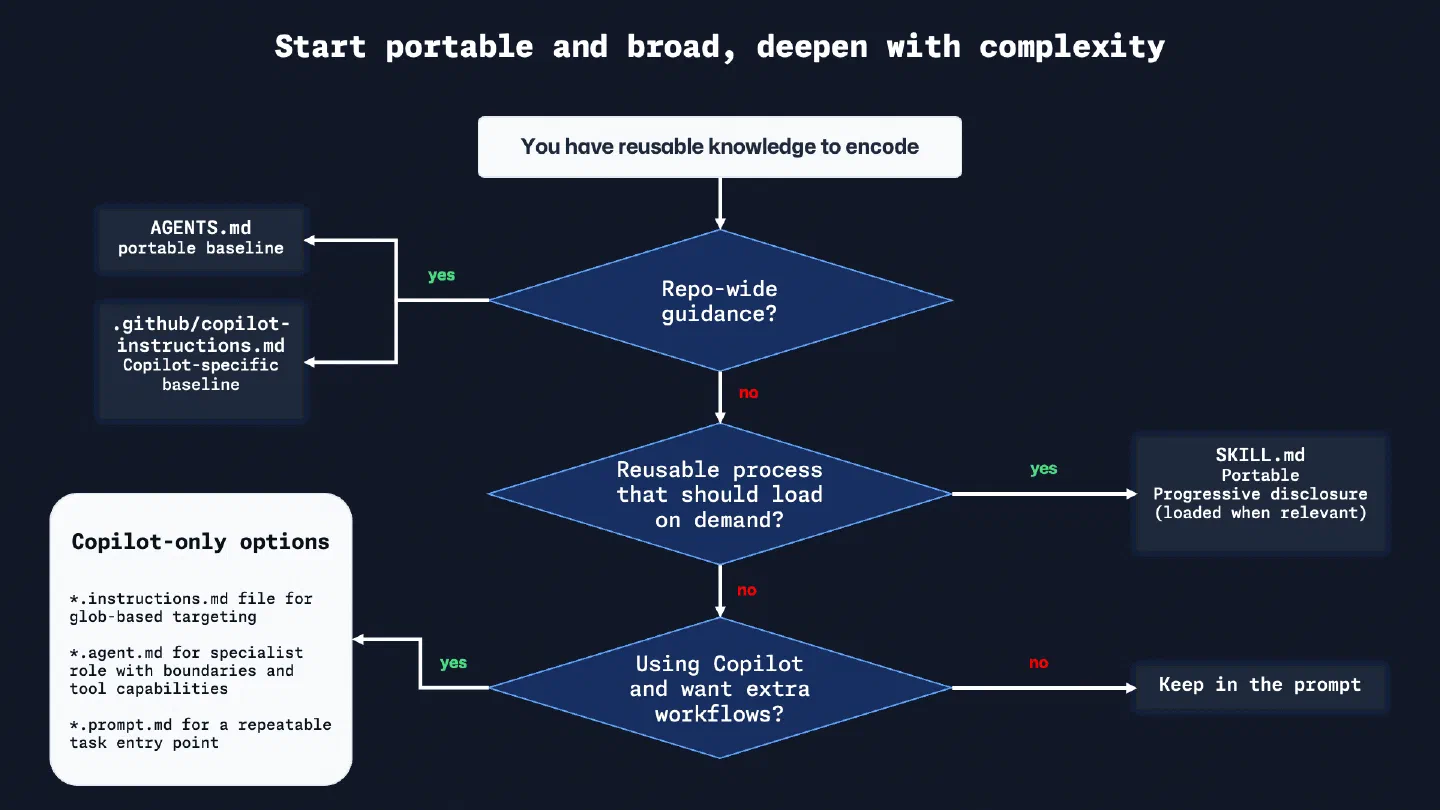
If you’re unsure which layer to start with, this flowchart may help. It is meant as a next-step guide, not a forced migration path. Remember, in Copilot, AGENTS.md and SKILL.md are perfectly valid starting points. I’ll add links to the follow-on posts in this series here as they publish:
Validate and adapt the templates
The file being present in the repository proves very little on its own. Did the agent find it? Were the relevant rules applied, or was there a contradiction in the instructions that prevented the desired result? Test the AGENTS.md and SKILL.md starter pair against a representative task before adding more guidance.
For the settings-page example, I might ask the agent to add a notification preference using the existing design system. I would then inspect four things:
- Did the agent reuse
Button,Input, or another existing component from the repository guidance? - Did it recognise that the design-to-component skill applied, without loading that procedure for an unrelated backend task?
- Did it run the named lint, test, and accessibility checks and report the results?
- Did the final response expose failed or skipped checks clearly enough for a reviewer to act on them?
When the answer is no, trace the failure before adding more instructions. The file may be in a location that your tool does not read. The skill description may be too vague for discovery. The instruction itself may be buried, contradictory, or impossible to verify. Fix the smallest of those problems and run another representative task.
At time of writing, support is moving quickly. Revisit the AGENTS.md guidance, Agent Skills specification, and your tool’s current documentation when you change agent hosts or upgrade their behaviour. The templates should preserve your working knowledge while their packaging adapts to the tool that reads them.
Portability: the knowledge is the asset
Chris, am I locking myself into a particular tool or format? The syntax, file locations and loading rules may change between tools. Your repository map, testing conventions, architecture constraints and review expectations remain consistent and useful across different tools.
That is the asset worth preserving. Moving to another agent tool becomes a translation exercise because the hard work of deciding what good looks like has already happened.
The compounding effect of reusable agent context
The compounding effect is the part I find most interesting in practice, and is something I’ve noticed in my conversations with dozens of developers at different stages of building with AI tools. Each useful instruction, procedure or entry point gives the next session a stronger baseline.
For individual developers, this means less setup before useful work begins. A prompt file saves time on a recurring task. A specialist agent improves a review pass. Together, these change the experience of working with the tool.
For teams, it starts to look like shared docs and better onboarding. New joiners benefit from conventions they didn’t have to rediscover. Patterns one team has worked out become easier for another team to pick up. Even when someone else picks up the work, the starting point is still better.
Equally, this is where learning in the open becomes useful. A public AGENTS.md, skill, or instruction pattern can give another developer a starting point for their own work. You can already see that in collections like Awesome Copilot. Sometimes giving back is as simple as pushing a well-written instruction file to a public repository.
Start with one AGENTS.md file or a procedure you repeat often. Pay attention to what you still have to explain in the prompt and what the agent consistently misses. That is where the next useful piece of reusable context will come from.
If you’ve been experimenting with any of these patterns, I’d love to hear what has ended up in your own toolbox. Drop a comment on the BlueSky thread below if you’d like to compare notes, connect with me on LinkedIn, or take a look at what I’m building on GitHub, where you’ll find working AGENTS.md files, prompt files, and agent definitions that I use day-to-day.
Until the next blog post, bye for now!
Bluesky Interactions
Related Content
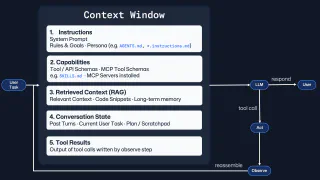
Context engineering: more context isn't better context
Better prompts help, but they're only part of the story. Context engineering is the craft of designing what an AI agent sees, when it sees it, and how that changes across the session. The goal isn't a bigger context window. It's a more effective one.

Rubber Duck Thursdays - Time to build!
 GitHub
In this live stream, we explore building a 3D tic-tac-toe visualization using Three.js and Copilot coding agent, demo MCP elicitation for gathering game preferences, and discuss the importance of context engineering when working with AI tools. We also cover GitHub changelog highlights including path-scoped custom instructions for Copilot code review and agents.md support.

Rubber Duck Thursdays - Let's build
GitHubIn this stream, Chris catches up on several weeks of GitHub updates including the remote MCP server preview and Copilot coding agent for business users. The live coding session demonstrates adding internationalization to the Copilot Airways app using Copilot coding agent, custom VS Code chat modes for planning, and agent mode in Xcode for iOS development.
Loading comments...