Context engineering: more context isn't better context
Better prompts help, but they're only part of the story. Context engineering is the craft of designing what an AI agent sees, when it sees it, and how that changes across the session. The goal isn't a bigger context window. It's a more effective one.
I was in a customer presentation recently where I asked the room whether they were familiar with the term prompt engineering. Almost everyone raised their hand. This wasn’t a surprise, given how it’s been used over the last 3 years to make sure that being specific, giving examples, and setting clear instructions are part of the conversation around AI tools.
But then I asked whether they were familiar with context engineering. Only a few people raised their hand, and even fewer were using it as a deliberate way to think about how they work with AI agents. I genuinely expected more people to have heard of it given how much the term has grown over the past year, even if they weren’t applying the principles just yet.
This feels similar to conversations I’ve seen online lately as well. People know context matters once agents start using tools and work across multiple turns, but they’re often still fuzzy on what “context” is or how to shape it deliberately.
Thinking of my own experience, I’ve lost count of how many times I’ve seen a coding agent start off strong, only to wander off because I gave it the wrong files, unnecessary history, or not enough goal clarity that it had too much room to guess.
The agent was doing exactly what I asked it to do. But what I asked for wasn’t exactly what I wanted it to do. I hadn’t given it the right information at the right time, in a shape it could actually use. If you were giving the task to a colleague, you’d probably hand them a clearer brief, point them at the right files, and tell them what to avoid. The same principles should apply to AI agents. They’re not mind readers; they need the right context to do their best work.
Why context engineering matters
That’s why I think context engineering is an underrated term. It points at the full context around an agent (what files or information it has access to, what history it carries, what tools it can use, and how it interacts with them) rather than only the prompt you’ve sent.
Most importantly, I don’t think the answer is to keep adding context until the window is full. Recent research on long-context models points in the other direction. Bigger windows help only if the model can still find, prioritise, and reason over what matters. Bloated, ambiguous, or poorly staged context can degrade performance rather than improve it.
Recent Hacker News discussions on AI-assisted coding and how teams collaborate with coding agents kept circling around the same points. One commenter described generated code that lacked any understanding of their problem area and only worked for the prompted case. In another thread, someone made a similar point at the team-level version: “What is missing yet is how to share all that context.”
What we’ll discuss here doesn’t just apply to GitHub Copilot (though it is my daily driver, so I’ll refer to it in examples). I keep running into situations where developers will keep working the prompt when the bigger problem is missing instructions, the wrong history being carried forward, or a workflow that can’t reach the information it actually needs.
Across the industry, the same concepts have been showing up under slightly different names: instruction files, AGENTS.md-style behaviour files, MCP servers, retrieval layers, memory, planning state, and tool loops. Repositories like github/awesome-copilot and GitHub’s own guidance on writing a strong AGENTS.md make it clear that developers are moving beyond one-off prompts and towards reusable artifacts
I’ve touched pieces of this already in some of my posts on the GitHub blog, like setting Copilot up well, turning issues into pull requests, managing context windows during a build, and using MCP elicitation to gather the right inputs. What I hadn’t done yet was join them up into a series which builds and deepens the points. So this post is my attempt to do that at the conceptual level first. The more practical follow-on posts can then go deeper on instruction files, memory, security, and the design of agent workflows without having to re-explain the core idea each time.
With that, let’s start with a definition.
What context engineering means in agentic AI
Chris, isn’t this just prompt engineering with a fresh label? Not quite, though I’ll admit the term doesn’t feel universally settled. You’ll see the same ideas described as advanced prompt engineering, or system design depending on who you ask. I find the distinction useful because it points at something prompt engineering alone doesn’t cover.
Prompt engineering is about how you ask. So in other words, think about prompt engineering as “What should I say?”. Context engineering is about what the agent is carrying with it while it works. That includes durable instructions, file selection, tool availability, information from prior interactions (memory), the earlier interactions in the session, review loops, and the rules that tell the agent what good looks like. So you can think about context engineering as “What should the agent know, what should it ignore, and how should that change from one step to the next?”
Context engineering is the practice of designing what goes into an AI agent’s context window at each stage of a workflow: what information it can access, what it is allowed to do, and how both change as the work progresses. Where prompt engineering focuses on wording a single request well, context engineering shapes the wider system of instructions, file access, tool availability, and review structure that the agent operates within.
| Question | Prompt engineering | Context engineering |
|---|---|---|
| Main focus | Wording the request well | Designing what goes into the context window |
| Typical concern | “How do I phrase this task?” | “What information, tools, and constraints should be available now?” |
| Scope | Usually a single interaction | The full workflow across multiple interactions |
| Typical artefacts | A prompt, an example, a role instruction | copilot-instructions.md, path rules, prompt chains, agent handoffs, file manifests, evaluation steps |
With AI agents, we’ve gone beyond conversational interactions; the model is now capable of doing things via tool calls, not just answering questions. They’re reading repositories, selecting tools to take action or gather information, editing files, opening pull requests, and handing work from one phase to another. The prompt is no longer the whole story.
This distinction also matters because more context isn’t the goal. Effective context is. A huge context window full of stale chat history (how often do you start a new session/chat thread?), half-relevant files, and duplicated instructions isn’t richer context. It’s just more work for the model to filter through before it can begin.
Think of it from your own experience. If you had to sift through a long email thread, a dozen files, and a messy document to understand what you were supposed to do, how well would you do? AI agents work the same way.
More context is not the same as better context
So why doesn’t “give it everything” work? The research points to a fundamental attention problem, not a hardware limitation.
- Foundational work like Lost in the Middle showed that long-context models do not use long inputs evenly. Performance was often strongest when the relevant information appeared at the beginning or end of the context, and significantly worse when the important detail sat in the middle.
- Newer research builds on that. NoLiMa tested 13 models that claim to support contexts of at least 128K tokens on retrieval tasks where the question and answer did not share obvious literal matches. Models that performed well in short contexts degraded significantly as context length increased.
- Long Context RAG Performance of Large Language Models reached a similar conclusion when considering retrieval-augmented generation. Retrieving more documents can help, but only a handful of the newest models kept their accuracy consistent once the total context moved beyond 64K tokens.
- Then Chroma’s 2025 Context Rot report (from the team behind the ChromaDB vector store) pushed the argument into more practical territory. Across 18 models (including current state-of-the-art from Anthropic, OpenAI, Google, and Alibaba), the authors found that performance degraded as input length increased even on deliberately controlled tasks. A model that has to search a noisy prompt for the right fact is doing extra work before it can even begin to reason.
Context windows are capacity, not a target. If the prompt forces the model to retrieve, rank, filter, and reason all at once, you have made the task harder. Good context engineering is not about stuffing the window, but reducing wasted attention.
So what does the right context actually look like? To answer that, it helps to understand what’s inside the context window in the first place.
The agentic loop starts before the first reply
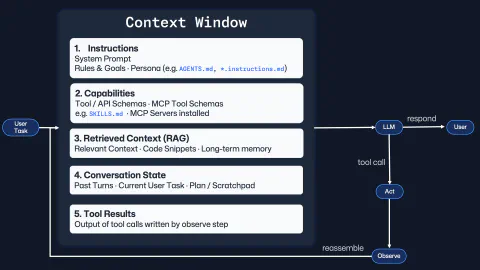
I’m a visual person; diagrams help me make abstract concepts concrete. So when I think about context engineering, I picture a loop that starts before the first prompt even goes out similar to the diagram below.
This is more of a mental model than an architecture diagram for any specific system, but it helps me to understand the moving parts of the context window in an agent session.

I find it useful to think of the context window as assembling five components: instructions, capabilities, retrieved context, conversation state, and tool results. Every response or tool call depends on what has already been assembled there.
With that, I’ll be using GitHub Copilot as my example throughout the rest of this post (and subsequent ones too), but the same loop is visible across modern agentic tooling:
- Instructions: the system prompt, goals, and agent behaviour files such as
.github/copilot-instructions.md,*.instructions.md, andAGENTS.md. - Capabilities: the tools the agent can actually use, from built-in tools/APIs to MCP tool schemas and skill manifests. These schemas are how the agent knows what it can do and how to do it.
- Retrieved context: the specific files, snippets, memories, and references pulled in because they’re relevant to the task at hand.
- Conversation state: the current task, previous turns, the plan, and the scratchpad that gives the session continuity.
- Tool results: the outputs from searches, builds, tests, and API calls that the observe step feeds back into the next turn.
I suspect your eye may be drawn to the context window itself, however, the loop on the right-hand side of the diagram is just as important. The model can respond directly, or it can call a tool to perform an action or gather more information. Once that happens, the system observes the result, rebuilds the context window, and hands the next turn back. Every prompt/response pair builds on the previous one. If the context gets sharper, the session gets better. If it gets polluted, the next turn has to fight through that mess.
That’s why I’m an advocate of starting new sessions when switching tasks. It’s also why I believe that subagents with more focused tasks (and their own isolated context windows) can be more effective, and why subdividing a workflow into clearer stages can help.
As agents get more capable, poor context gets more expensive
Equally, the stakes around the context engineering design decisions are rising. The more capable the agent, the more expensive it is to get the context wrong.
If a weak autocomplete suggestion is wrong, you delete a line and move on. If an agent spends twenty minutes reading the wrong files, touches unrelated areas of a repository, or confidently follows stale assumptions, you’ve likely got a bigger clean-up job.
I think some teams over-focus on model choice as the core problem. Model choice matters as each one has its own strengths and weaknesses. Imagine that you have two sessions with the same underlying model, but one has been designed with repo-specific instructions, a clear task, and a tight feedback loop, while the other is just “please fix this” in an existing session with a wall of previous interactions. The first workflow will likely look much smarter even with the same underlying model, because the context engineering has made it easier for the model to do its best work.
| Naive agent workflow | Context-engineered workflow |
|---|---|
| “Please fix the bug” with minimal detail | Issue, acceptance criteria, constraints, and validation steps provided up front |
| Agent explores the whole repo from scratch | Agent starts with the likely files, architecture notes, and known validation commands |
| One long conversation tries to do everything | Discovery, planning, implementation, and review are separated into separate sessions / agents |
| Repo conventions are implicit | Repo conventions live in durable instructions |
| Success judged by whether the answer sounds plausible | Success judged by outcomes you can verify, not by whether the output sounds plausible |
This is where the “engineering” in context engineering starts. You’re shaping inputs, boundaries, and feedback loops and most importantly, deciding what to leave out. But like any craft, we can only improve if we have some way of telling whether it is actually getting better.
Measuring whether it’s working
But how can we actually tell? We might say that a particular session “felt better”, but we don’t always know what better actually means. Now this section isn’t going into AI evaluations, or metrics in a a strict sense. They’re signals that I’ve found useful when I’m iterating on my work and trying to improve my workflows with agents:
| Signal | What improvement looks like |
|---|---|
| How often I have to pull the agent back on course | Fewer moments where I have to clarify my intent: “Don’t we already have an interface for this aspect of the task?” or “Sorry, I wasn’t fully clear about the requirements. What I actually want is…” |
| How often I have to restate the same standards | Repo conventions, validation steps, and do-not-do rules are already present in durable instructions instead of me retyping them each session |
| How often I have to re-explain the project basics | The agent stops asking which command to run, where the relevant files live, or how the project is structured |
| How often the diff wanders | Changes stay close to the intended files rather than drifting into unrelated clean-up or speculative refactors |
| Whether I am starting new sessions | Starting new sessions when switching tasks is a sign that the workflow is designed to keep the context focused rather than bloated |
| How often review catches misunderstanding rather than mistakes | Validation still finds defects, but fewer of them come from the agent solving the wrong problem or inventing its own brief |
None of this makes agents infallible, but it makes them easier to work with. Done well, context engineering pulls the important bits out into forms others can use: shared instructions, clear constraints, explicit validation steps, and visible decisions.
That last point matters more once you move from a single developer experimenting with AI to adopting agentic systems acrossa whole team.
The opportunity for teams
Teams are at different stages of this journey. Some are still treating agents like smarter autocomplete where every session starts from scratch and everyone hopes the model will figure it out. Others are shaping the workflow itself with shared instructions, tighter handoffs, cleaner stages, and better review points.
What changes at the team level is that context engineering stops being about a single session. It becomes about how work flows between agents, what each one gets to see, and how they check each other’s work. This is where organisational design thinking starts to matter. The same questions you’d ask when splitting work across a team apply here: who handles discovery, who handles implementation, who reviews, and what gets passed at each handoff.
Give an agent a narrow brief, the right files, and a clear way to check the work, and you usually get a better result. Hand it a sprawling remit and hope for the best, and it drifts. Fast. And once you start thinking that way, context engineering stops being a technique you apply to a single session. It becomes the foundation everything else is built on.
Why context engineering is only the beginning
Once you start noticing context this way, you stop looking only at the prompt and start asking questions about the whole setup. Using the diagram as our guide, the next questions almost fall out of it:
- Instructions and capabilities lead into reusable agent skills and
AGENTS.md-style files. Once you stop treating every workflow as a one-off, you start asking how to package useful behaviour so teams can share it. - Conversation state and retrieved context lead into memory. Not just what fits inside one session, but what should persist across sessions and how it gets brought back safely.
- Tool access and tool results lead into security. If an agent can search, run commands, call APIs, or touch infrastructure, guardrails stop being optional. That question is easy to ignore until something goes wrong.
- Observed results and feedback loops lead into quality gates. If code is being produced faster, then linting, tests, type-checking, and scanning matter even more.
- Quality gates and review stages lead into evaluation. If you’re building a system of agents, you need to know how to measure whether it’s working and where the bottlenecks are.
- The whole approach leads into a question of signal versus noise. In a world where AI-generated output is everywhere, the genuinely useful work still comes from lived experience, durable conventions, and bringing quality in at every stage, not just at the end.
This post has been deliberately conceptual. The follow-up posts will be more practical and concrete: I’ve been building a few personal projects that illustrate these ideas and I want to share what I’ve learned from them, but the common foundation needed to come first.
If you’ve been experimenting with context engineering, or learning out in the open with it like I am, I’d love to hear how you’re structuring your instructions, prompts, and handoffs. Drop a message on the BlueSky post below, or drop me a DM on LinkedIn. You can also find my repos (and plenty of in flight projects) on GitHub.
Until the next post, bye for now!
Bluesky Interactions
Comments
Related Content

Rubber Duck Thursdays - Let's build with custom agents
 GitHub
Chris dives into Copilot custom agents and custom instructions for the turn-based game MCP server project. After reviewing the changelog including enterprise bring-your-own-key support and Claude Opus 4.5, he restructures copilot-instructions.md, creates meta instruction files for writing instructions and agents, and explores plan mode for iterating on agent designs.

Rubber Duck Thursdays - Time to build!
GitHubIn this live stream, we explore building a 3D tic-tac-toe visualization using Three.js and Copilot coding agent, demo MCP elicitation for gathering game preferences, and discuss the importance of context engineering when working with AI tools. We also cover GitHub changelog highlights including path-scoped custom instructions for Copilot code review and agents.md support.

Rubber Duck Thursdays - Let's build
GitHubIn this stream, Chris catches up on several weeks of GitHub updates including the remote MCP server preview and Copilot coding agent for business users. The live coding session demonstrates adding internationalization to the Copilot Airways app using Copilot coding agent, custom VS Code chat modes for planning, and agent mode in Xcode for iOS development.